AstroPay availability can vary by casino, while bonus eligibility, deposit limits and payout routes may follow separate rules.

An AstroPay logo on a payment page is not enough to tell you whether you can use it to fund a casino account. The cashier is the useful test: payment options can differ between sites and may change, so check the methods shown after signing in rather than relying on a general list or an old mention elsewhere. If AstroPay is not offered there, a bonus page cannot make it available.
Keep the payment question separate from the games question. A casino might offer slots without offering AstroPay, or list AstroPay without giving you any special access to particular games. I would not treat “AstroPay slots” as a distinct category. The payment method concerns how you fund an account; the casino’s game catalogue is a separate matter.
That distinction matters when you see a promotion advertised alongside a payment logo. A welcome offer may have its own eligibility rules, and those rules can depend on how you deposit. Before opting in, read the promotion’s terms for the eligible payment methods and any exclusions. If the wording is unclear, ask the casino to confirm whether an AstroPay deposit qualifies before you pay. A banner is not the terms.
If you’re looking for a UK casino that accepts AstroPay, check that the payment method is currently available to you before depositing. The details below provide one confirmed practical point for each operator: its stated payout speed.
WinBeast
WinBeast lists a payout speed of 1–3 business days. Check directly whether AstroPay is available for your account.
SpinFormula
SpinFormula lists a payout speed of 1–3 business days. Check directly whether AstroPay is available for your account.
NightWin
NightWin lists a payout speed of 1–3 business days. Check directly whether AstroPay is available for your account.
EvoSpin
EvoSpin lists a payout speed of 1–3 business days. Check directly whether AstroPay is available for your account.
SlotoSport
SlotoSport lists a payout speed of 1–3 business days. Check directly whether AstroPay is available for your account.
Jetsetspins
Jetsetspins lists a payout speed of 1–3 business days. Check directly whether AstroPay is available for your account.
NightLuck
NightLuck lists a payout speed of 1–3 business days. Check directly whether AstroPay is available for your account.
x3bet
x3bet lists a payout speed of 1–3 business days. Check directly whether AstroPay is available for your account.
Zombillion
Zombillion lists a payout speed of 1–3 business days. Check directly whether AstroPay is available for your account.
BeOnBet
BeOnBet lists a payout speed of 1–3 business days. Check directly whether AstroPay is available for your account.
The same goes for a bonus described as available to new customers. Do not assume that every deposit route qualifies just because the promotion appears on the casino’s main page. The cashier and bonus terms answer different questions: one shows whether a payment method is available to your account, while the other sets the conditions for receiving the offer. Check both.
E-wallet examples are a useful reminder, not a substitute for checking. A specialist casino review has reported that PayPal can be excluded from bonus eligibility, despite its appeal for speed and convenience. The same type of review has reported that Skrill and Neteller are available at some sites but are often excluded from promotions. Those observations do not establish the current rules at a particular casino. Read that operator’s terms before choosing your payment route.
There is no reason to assume AstroPay follows the same rules as those wallets, either. A casino may treat payment methods differently, and a promotion can name permitted routes or exclude particular ones. If AstroPay appears in the cashier but the offer terms say nothing about it, do not fill in the gap with a guess. Check with the operator and keep the answer in writing if you are making a decision around a bonus.
The wording of the offer is worth slowing down for. Look for a definition of eligible deposits, exclusions for payment methods, and any instruction about opting in. Then check that the offer is still available to you and that you have followed the stated steps. A promotion can have conditions beyond the payment method, so seeing AstroPay accepted does not by itself mean you will receive a bonus.
The reverse is just as important: a bonus being available does not prove that AstroPay is accepted. Some casino pages discuss promotions broadly, while the cashier presents the options that can actually be used for your account. Treat claims about AstroPay deposits, casino accounts or bonus access as provisional until the operator’s own current information agrees.
If you are interested mainly in playing slots, check the casino’s games section separately from the cashier. The payment method does not identify which titles are available, and a promotion does not guarantee access to any particular slot. Read the bonus rules for game eligibility as well; if a promotion has restrictions on what counts towards its conditions, the terms should explain them. Do not infer a game list from a payment label.
A practical order helps: first see whether AstroPay is displayed as an available deposit method for your account; then read the specific bonus terms; finally, check the games and any game-related conditions attached to the offer. If one part does not line up, pause rather than assuming the other parts will sort it out. Nothing clever about that.
For UK players, make sure the casino is operating under the relevant UK Gambling Commission licence before opening an account or depositing. A site’s payment options and promotions do not establish that it is authorised to serve you. The cashier can help you confirm what the site accepts, but it cannot replace checking the operator’s status.
So, if you are looking for an AstroPay casino bonus or hoping to deposit with AstroPay and play slots, make each check on its own. Confirm the method in the casino cashier, confirm bonus eligibility in the offer’s terms, and confirm game conditions in the casino’s own information. That is less exciting than a bright banner. It is also how you avoid counting a promotion—or a payment route—before it is actually available.
Treat AstroPay as a payment option to confirm, not one you can assume will appear at every casino. Before choosing an amount, open the cashier while signed in and look at the deposit methods shown for your account. A payment logo on a promotional page or a general list of methods may not tell you what is available at the point of payment.
Start with the deposit screen itself. If AstroPay is listed, select it and read the details displayed before continuing. Check that the method is available for your account and that the next step is clear: the cashier should show the amount you intend to deposit and explain what action will follow. If AstroPay is absent, do not try to force the transaction through another route or assume that a support agent can make an unavailable option work.
Then check the minimum deposit shown beside the method. A specialist casino review reports minimum deposits in the £10–£20 range, with the figure depending on the payment method. That is a broad guide from a review, not a promise about AstroPay or a particular casino. Use the cashier’s current figure for the method you have selected. If it is not displayed until you choose a payment option, check before entering or confirming any payment details.
The maximum matters too. A cashier may impose a cap on a single transaction, while separate daily or monthly account limits may also apply. These figures can depend on the payment method and the status of your account. A specialist casino review notes that maximum deposit limits vary on those grounds; the practical answer is to read the terms shown in your own cashier rather than borrowing a limit from a review of another site.
Pay attention to whether the amount field is editable and whether the cashier clearly marks the permitted range. If your intended deposit falls outside it, stop and check the displayed rules. Repeatedly submitting different amounts is a poor way to discover a limit: it can create confusion about which transaction, if any, is pending.
Before confirming, review the transaction summary. Make sure the selected method, deposit amount and any visible charge are what you expect. If the cashier redirects you to another payment page, pause there as well. Check that the amount has not changed and that you understand what you are authorising. A familiar-looking logo is not a substitute for checking the details of the actual transaction.
Making a Deposit
Verify Availability
Open the cashier while signed in and confirm that AstroPay is listed as a deposit method for your account.
Check Limits
Review the minimum and maximum deposit amounts displayed beside the method in the cashier.
Final Review
Inspect the transaction summary on the final confirmation screen to verify the amount and any visible charges.
It is also worth checking whether your account has a restriction that affects deposits. The available amount can vary with account status, so an option or limit shown before signing in may not match what appears once you are logged into your own account. If a limit seems unexpectedly low, or the payment is declined, read the message and contact the casino through its official support channel before trying again. Do not assume the problem is with AstroPay itself.
For a mobile casino app, make the same checks inside the app’s cashier rather than relying on what you saw on a desktop page. The payment menu and amount limits you can actually use are the ones presented in your signed-in account at the time. If the app does not explain a restriction clearly, check the casino’s own help pages or ask support to clarify it before making a deposit.
Keep the decision simple: confirm that AstroPay is listed for your account, read the method-specific minimum and any applicable maximum, and inspect the amount again on the final confirmation screen. If one of those details is missing or unclear, leave the transaction unfinished until you have an answer. Better a paused deposit than a surprise.
A payment method can appear on a casino’s general information page and still be unavailable to you when you go to pay. The cashier is the practical check: it shows the options the operator currently presents for your account, rather than what a broad payment list says may be supported.
If you want to use AstroPay, sign in and open the cashier before treating it as an option. Look for AstroPay among the displayed methods and check whether it is available for your account. If it is not shown, do not assume that a mention elsewhere means you can use it. Availability can depend on the casino and the current cashier setup; a general claim does not confirm that the method is active for every customer.
It is also worth checking the actual payment product, not just its brand. A specialist casino review may list Visa and Mastercard, for instance, but that does not establish that every card product is eligible or available to UK customers. The cashier is where you should confirm the option presented for your own transaction. That distinction matters: a familiar logo is not a payment approval.
Take the same approach with any method you are considering. Open the cashier, locate the payment option, and read the information shown beside it before proceeding. Check that the route is presented as an available choice, rather than appearing only in a general description or an old review. If the details are unclear or the option is missing, ask the casino’s support team to confirm the current position. A direct answer about your account is more useful than a broad statement that the casino “accepts” a method.
Be precise about what you are checking. Seeing a method in one part of a casino’s site does not necessarily tell you whether it can be used for the transaction you have in mind. In particular, a deposit option should not be treated as proof that the same route is supported for withdrawals. Check the relevant cashier information for each direction before you rely on a payment route. Closed-loop rules may also affect how a casino handles funds, so do not infer the payout route from a deposit logo.
A sensible check is to confirm the operator is licensed for the British market, then inspect the signed-in cashier and its current payment information. Remote gambling licensees serving Great Britain need the appropriate UK Gambling Commission licence. The operator’s licence status and the cashier’s payment list answer different questions: one concerns regulation, the other whether a method is available to you.
I would not choose a casino based solely on a page promising AstroPay deposits. Confirm the option in the live cashier, and make sure the wording covers the transaction you intend to make. If it does not, pause and ask before moving money. Small check. Avoidable hassle.
A casino’s acceptance of debit cards does not mean it accepts every payment route that looks card-based. UK casinos commonly accept debit cards, including Visa and Mastercard, but that fact cannot be stretched to cover AstroPay or a product described as an AstroPay card. The name alone does not tell you how a transaction is classified or whether the casino will allow it.
That distinction matters because the UK restriction is specific: credit-card payments for gambling have been banned since 14 April 2020, and the rule has not been relaxed. A payment route cannot be treated as an acceptable debit card simply because it involves a card, carries a familiar logo, or lets you pay online. The funding source and the way the transaction is processed matter.
I would keep three things separate when reading a cashier: a bank debit card, a credit card, and any prepaid or payment-service product described as a card. They are not interchangeable categories. A casino listing Visa or Mastercard is referring to a payment option it presents for its customers; it is not a blanket statement that every card carrying those names, or every service that can be used like a card, will work.
The same caution applies if you are looking for an AstroPay option on a mobile casino. A mobile payment screen may display a method differently from a desktop cashier, but the device does not change the UK credit-card restriction or establish that a particular AstroPay route is eligible. Don’t infer acceptance from a card-shaped icon or a general reference to card payments.
There is a practical difference between “AstroPay is listed” and “this exact route is eligible for this transaction”. A product may have its own conditions, and the casino’s card options may be limited to particular types of card. If you cannot tell whether a route is a debit card or how it is funded, don’t assume it falls within the debit-card category. Pause before paying rather than finding out after the transaction is declined.
Searches for casinos accepting AstroPay cards often blur these categories together. The careful answer is not that AstroPay is accepted wherever Visa or Mastercard is accepted; those are separate claims. Likewise, a site’s general acceptance of debit cards does not establish that it accepts AstroPay payments, whether on desktop or mobile. Treat the payment route as its own option, not as a substitute label for a bank card.
For UK players, the boundary is straightforward even if product labels are not: debit cards are commonly accepted, while credit-card payments for gambling are prohibited. Keep those facts distinct when considering a card-like service. A familiar name is not a classification. That’s the key point.
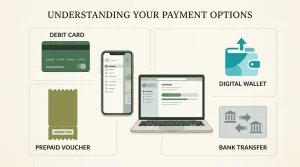
If AstroPay is not shown in a casino’s cashier, the alternatives are not interchangeable. Some routes can handle both deposits and withdrawals, while others are deposit-only; promotion rules can differ too. I’d compare what the cashier actually offers with how you plan to use the account, rather than picking a method just because you recognise its name.
A bank transfer may suit you if you prefer paying directly from your bank account. Open banking services can also connect a payment to your bank without using a card. A specialist review describes these routes as providing instant deposits and fast withdrawals at many sites, but that is not a promise for every casino or account. Check the cashier’s details for the specific route, including whether it is available for deposits, withdrawals, or both.
These options are worth considering when you want a route that may support money moving in either direction. The casino’s process still matters, so don’t assume that a quick deposit means a payout will be just as quick.
Paysafecard is a prepaid voucher and is deposit-only. That makes it a straightforward way to add funds where a casino accepts it, but it is not a complete payment route if you also expect to withdraw through the same method. Think of it as a way to fund play, not as a substitute for an account that handles both sides of a transaction.
Before buying or using a voucher, make sure the cashier lists it and check the operator’s instructions. A voucher being available elsewhere does not mean it will be offered at the casino you have chosen.
Skrill and Neteller are available at some casino sites. A specialist review reports that they are often excluded from promotions, so check the offer’s payment terms before choosing one to deposit. The cashier and the bonus rules answer different questions: a wallet may be accepted for payment while still being ineligible for a particular promotion.
E-wallet availability can also vary between casinos. If you already use one, confirm that the name and account details match the casino account, and read the withdrawal conditions before relying on it as your only route.
For a payment method that may support both deposits and withdrawals, look for that distinction in the cashier rather than inferring it from a logo. For a deposit-only voucher, decide beforehand how you would receive any payout. For an e-wallet, consider whether the promotion you want allows it.
There is no single best alternative for every player: the right fit depends on the methods listed at the casino and the terms attached to your chosen promotion. A little checking before you pay can spare you an awkward surprise later.
Supports direct payments from your bank account; may handle both deposits and withdrawals.
Includes options like Paysafecard; these are deposit-only methods.
Includes Skrill and Neteller; often available but may be excluded from certain promotions.
A payment option and a game catalogue are separate things. Seeing AstroPay mentioned on a casino website would not tell you which games that site offers, and the games available would not show whether AstroPay can be used to pay. Check each point on its own; don’t treat a payment label as a recommendation for particular slots or other games.
The same goes for searches for AstroPay casinos with games or mobile play. A phone-friendly site may let you browse its catalogue on a mobile, but that says nothing about its payment options. Nor does the presence of AstroPay establish that a casino has a special set of AstroPay slots. Choose games by checking the casino’s own catalogue and rules, not by assuming a payment method comes with a particular selection.
Before you get as far as choosing a game, look at the account controls. UK Gambling Commission rules require remote gambling operators to ask new customers to set a financial limit before their first deposit. They must also make account-level limit controls accessible. In practice, that means you should be able to find the limit settings in your account rather than having to guess where they are.
Set a limit you can afford before play begins, and check what the control covers. A deposit limit restricts money going into the account; other controls may apply to time spent or losses, so read the labels rather than assuming one setting does everything. If you cannot find the required prompt or the account-level controls, pause and contact the operator before depositing.
That step matters whether you are playing slots, table games or anything else. A payment method does not change the need to keep spending within a planned budget. And a game’s appearance on a mobile screen is no reason to skip the limit settings.
I would keep the order simple: confirm the casino’s game information, set the account limit, then make any payment decision separately. Don’t pick a casino because a page uses phrases such as “best AstroPay games” or “AstroPay slots” unless the actual game catalogue backs up what it says. The cashier and the catalogue answer different questions.
If a bonus is part of your decision, read its terms as well; payment eligibility and game eligibility are distinct checks. A game may count differently towards a promotion, or be excluded by its terms. Don’t assume that depositing through a particular route qualifies every game or offer.
There is no useful shortcut here: AstroPay does not tell you what to play, and the games do not establish that AstroPay is available. Check the current catalogue and account controls directly, and make your choices one at a time. Limits first.
When you pay into a casino account, keep the names aligned: the gambling account and the payment account should belong to the same customer. That simple match can reduce avoidable friction caused by basic ownership details. It is a sensible habit whether you are considering AstroPay or another route; it does not tell you whether the casino accepts that method.
I would treat a payment account in someone else’s name as a needless complication. Even if you have permission to use it, the casino may have difficulty matching the transaction to your account. That can prompt questions about who owns the funds or who is making the payment. There is no benefit in creating that uncertainty when you can use an account in your own name.
The clearest arrangement is often one named account used consistently for deposits and withdrawals. A steady, easy-to-follow trail is less likely to create ownership confusion than switching between accounts belonging to different people. Keep your casino details accurate, too. If the name on your payment account differs from the name you registered with, check what needs correcting before you transact rather than hoping the mismatch will pass unnoticed.
That is about ownership, not payment availability. A search result saying that a casino takes AstroPay does not establish that the method is offered to you, or that a particular AstroPay product can be used. Nor does a matching name make an unsupported payment route usable. Check the cashier separately, then make sure the account you select is yours.
If a casino asks for information to establish that a payment account belongs to you, respond through its official account or support channel. Keep records of the transaction and any relevant messages. Do not send account credentials to someone claiming they can “fix” a payment for you; ownership checks are not a reason to hand over access.
A useful pre-payment check is straightforward: casino account in your name, payment account in your name, and the same details used consistently. If something does not match, pause and resolve it first. Less ambiguity, fewer headaches.
Before you confirm a deposit, check the currency shown for your casino account. A specialist review of casino payment pages reports that GBP is supported, but that does not tell you what currency every account will use. Confirm the setting directly in your account before your first transaction.
This matters because a payment can be accepted while the casino account is set to a different currency. If that happens, the amount may be converted, and the figure credited to your balance may not match the amount you expected. Check the deposit summary as well as the account settings: the key detail is the currency the casino says it will credit.
If you are considering AstroPay, treat the payment method and the account currency as separate checks. A currency setting does not confirm that AstroPay is available, and seeing a payment option would not, on its own, confirm that your account is denominated in GBP. Look at the details displayed for your own account before proceeding.
I would also pause if the cashier shows a currency you do not recognise or the final amount is unclear. Do not guess from a symbol alone; check the currency label and the amount that will reach your casino balance. If the account is not set to GBP, find out what conversion applies before paying. A small detail, with a real effect.
There is no need to rush through this screen. If you cannot establish which currency will be used, leave the deposit unconfirmed and check the casino’s account or payment information. Once a transaction has gone through, a conversion may already have affected the credited balance.
The practical check is simple: confirm that your account supports GBP, then review the currency and credited amount shown at the final step. That keeps the focus on what you will actually see in your balance, rather than assuming that a UK-facing cashier automatically means a sterling account.
A deposit method does not automatically determine where your winnings can be sent. If you are looking for AstroPay withdrawals at UK casinos, check the cashier’s withdrawal options and the operator’s terms rather than assuming a deposit route works in reverse. Availability can depend on the payment method and the casino’s own procedures.
UK anti-money-laundering controls commonly require a casino to return funds to the original payment source. This closed-loop approach helps the operator check where money came from and where it is going. So even if you deposit through AstroPay, the casino may not offer a direct withdrawal to AstroPay. It may ask you to use another eligible route, or divide a payout between sources where its rules require that.
That is why “deposit and withdrawal” should be treated as two separate checks. Before you rely on AstroPay as a complete payment route, look for a clear statement about withdrawals in the cashier or payment terms. If the wording is unclear, ask customer support how a withdrawal would be handled before depositing. A payment logo on a deposit page is not an answer to that question.
Timing is separate again. A specialist casino review notes that the first withdrawal may take longer while the operator completes approval and verification. That is not a promise of a set processing time: internal checks and the status of your account can affect when a payment is released. A later withdrawal may follow a different timetable, but the casino’s current terms are the place to confirm it.
If you are waiting on a payout, check whether the casino has requested information or documents and whether the withdrawal is still under review. A pending request is not necessarily a payment-provider delay; the operator’s approval comes first. Keep any support reply and follow the casino’s stated process if you need clarification.
Be wary of claims about instant AstroPay payouts unless the operator explains the route and conditions. A casino serving UK customers must hold the relevant UK Gambling Commission licence; an offshore site without one is outside that regulatory system. The payment method does not change that. Verify the operator’s status before sending money, then confirm the withdrawal route in writing if anything remains uncertain.
A payment can look free in the casino cashier and still cost you elsewhere. A specialist payments review identifies several possible charges: the casino may apply a fee, the payment provider may take one, and your bank or card issuer may add its own. If money is converted, the exchange-rate spread can matter too; a network fee may also apply.
That is why I would not judge a method by a single “no fee” label. Check the casino’s payment terms, then look at the provider’s charges and your bank’s conditions. A fee shown before you confirm is only one part of the picture. A less visible exchange-rate spread can cost more than a stated flat charge.
For an AstroPay payment, first establish whether the option appears in the casino cashier; if it does, check the costs attached to that specific transaction. The same goes for any alternative. A payment route that costs less for one amount or currency may not be the least costly for another.
There is no universal cheapest method. Compare the casino charge, provider fee, conversion spread and any network cost for the amount you intend to pay. If the total is unclear, pause and check with the provider or casino before confirming. Small print is not a pricing strategy.
Returning funds to the original payment source is a common anti-fraud and anti-money-laundering control. Using another route may require additional verification.
PayPal, open banking services and debit cards connected to fast payout systems are generally among the quickest. The casino’s approval process and your verification status also affect how quickly you receive funds.
Common options include Visa and Mastercard debit cards, bank transfers, open banking and e-wallets such as Skrill or Neteller. Available methods vary by casino, so check the cashier for your account.
No. Visa and Mastercard are card networks, so check the card product and the casino cashier to confirm eligibility. Credit card gambling has been banned in the UK since 14 April 2020.
Yes, Skrill is common at UK-friendly casino sites, though availability can vary by casino and it is often excluded from promotions. Check the cashier and bonus terms before depositing.
Yes, GBP is supported at the listed sites. Confirm your account currency before your first transaction to avoid conversion costs.
Minimum deposits commonly start at £10–£20, depending on the payment method. Check the amount shown in the cashier for your selected method.